Cursor halo and spotlight
A soft glow follows the pointer, or everything but a circle around it dims. It is drawn into the video itself, so it shows in every player.
Spotlit adds a cursor spotlight, smooth auto-zoom, keycaps and live captions to your recordings, drawn into the video as you record. No account, no cloud, no telemetry.
What your viewers see
Viewers lose the thread when a cursor is tiny and a screen is crowded. Spotlit guides their eyes while you work normally, and the effects are part of the video, so they show in every player.
Effects
A soft glow follows the pointer, or everything but a circle around it dims. It is drawn into the video itself, so it shows in every player.
Zooms in where you work and eases out when you move on. It never stays zoomed: after the time you set it returns to normal.
Notices where text is appearing and follows it, even when the mouse is elsewhere. It reads what changes on screen, never your keys.
Shortcuts and function keys appear as keycaps. Typed letters stay hidden unless you turn them on, and Ctrl + Alt + K pauses it instantly.
Subtitles as you speak, from a speech model that runs on your own computer. Your voice and the words never leave it. English for now.
Switch windows or open a new page and a short effect plays: a zoom punch, a flash, a ripple or a light sweep. Scrolling and video do not trigger it.
The recorder
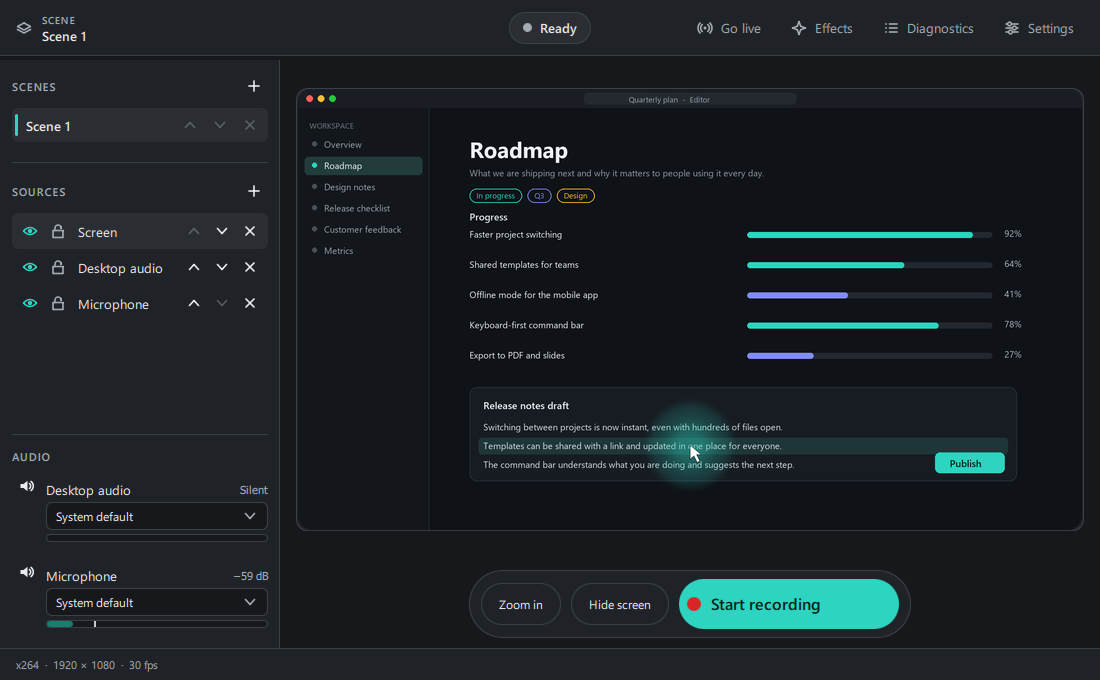
Place everything exactly where you want it, with a short path to a good-looking recording.
Drag your screen, a window or a camera anywhere on the picture and resize it by its corners. Snap to the edges and centre, fit or fill, mirror it, flip it. It works live, even mid-recording.
Add a webcam as a picture-in-picture and mirror it for a natural selfie view. Load plugins from a folder to add sources like a phone camera.
Record one window, whichever window is in front, or a full-screen game or video the moment it goes full screen.
Cover the screen with a plain card in one click, or hide it automatically when a private app comes to the front.
Stream to Twitch, YouTube or any server with an address and a stream key. Nothing is sent until you press Go live.
Screen, desktop sound and microphone with live meters. Record with x264, or with your graphics card: NVENC, Quick Sync or VA-API.
A tray or menu-bar icon shows when you are recording and lets you start, stop, pause or zoom without opening the window.
How it works
Add your screen, a window, your webcam, desktop audio and the microphone. Check the level meters, then drag things where you want them.
Turn on the halo, auto-zoom, keycaps or captions. Presets get you going and every setting is adjustable, with a live preview.
Press record. The effects are drawn into the file as it is written, so there is nothing to edit or export afterwards.
Privacy
Screen recorders see a lot. Spotlit is built so that you do not have to take its word for what it does with it.
No analytics, no accounts, no update pings. The app makes no network connection on its own.
Captions are made on your machine. What you say is never saved or written to a log.
The keystroke overlay is off by default, hides typed letters even when on, shows a visible indicator, and pauses with one hotkey.
Diagnostics stay in memory and redact secrets and personal paths. Nothing is written unless you export it.
Read the full privacy policy.
Download
Free for everyone. Pick your system; each card says how much it has been tested.
Installer (.exe) · Windows 10 and 11, 64-bit
Capture, audio, x264, NVENC and Quick Sync, every effect, webcams and plugins have been run on Windows 11. One monitor at 100% scaling so far.
AppImage · 64-bit
Developed on KDE Wayland, X11 partly tested. The AppImage is new and has not been verified on other desktops.
Disk image (.dmg) · Apple silicon
Written but never run on a Mac. It is unsigned, so macOS will ask you to approve it and to allow Screen Recording. Treat it as a preview.
Version 0.1.1. Every file is listed with its SHA-256 on the releases page (checksums).
Nothing. Spotlit is free software under the GPL-2.0-or-later licence. There is no account, ad or paid tier.
Both. Go live sends your picture to the server address you enter with your stream key, only after you start it.
Yes, through a plugin. Spotlit loads plugins from a folder, and any source a plugin adds can be placed on the picture, mirrored and resized like a webcam. It has been tried with a phone-camera plugin on Windows. Plugins run code with the app's permissions, so install only ones you trust.
It uses each system's own mechanism and explains the limits instead of working around them. Wayland does not let apps see keys at all (a demo mode is offered). On Windows it cannot see keys while an administrator window has focus, and it cannot tell that a password field is focused, so keep typed letters off when you enter secrets. On macOS it needs the Input Monitoring permission.
It is an early version (0.1). Windows has been tested the most. Linux was built and tried by the developer, and macOS has not been run yet. The cards in the download section say what has actually been tested.
The installer is not code-signed yet, so SmartScreen does not recognise it. Choose More info, then Run anyway, if you trust the source. Every file's SHA-256 is on the releases page so you can verify it.
Free to download, and nothing leaves your computer.